A playlist. A batch. All together.
Paste multiple links, organise them in a batch, and manage the collection from one place. Pause, resume or retry without losing your place.
▤ Weekend collection3 videos · one organised batch
Your queue, your paceYour videos, audio and playlists.
One link. One beautifully simple workspace.
Windows 10 / 11 · 64-bit • Free to get started
Availability depends on the website, the video and your access to it.
SMALL DETAILS. A BETTER WORKFLOW.
From a single favourite to a whole playlist.
Keep your downloads organised, without the busywork.
Paste multiple links, organise them in a batch, and manage the collection from one place. Pause, resume or retry without losing your place.
Choose a resolution, or select the maximum quality the source offers. Download up to 4K when available.
Save a supported video as audio with the format choices available in the app. Keep listening, even when you are offline.
Save artwork beside your videos. Choose filenames based on the video title or channel name.
Manage simultaneous downloads, retry interrupted items, and keep downloading in the background with the app's settings.
Speed depends on your connection and the source server.
Send a message through Support in UltraDL. Replies stay in the same conversation, so you can pick up where you left off.
A LITTLE CALMER. A LOT MORE ORGANISED.
A clear library, practical controls and a glass-inspired interface.
Everything right where you left it.
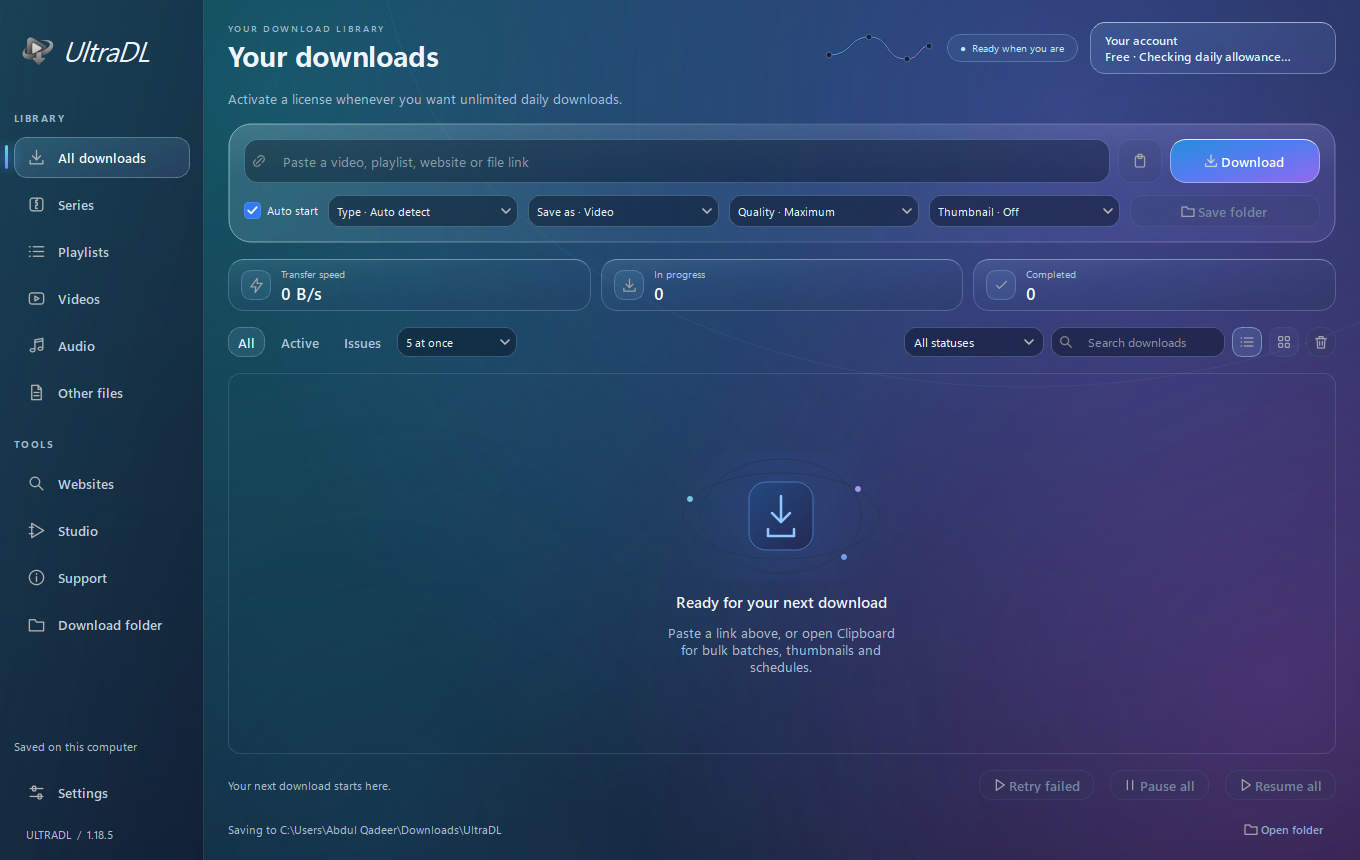
Actual UltraDL Windows interface. Appearance may vary by version and settings.
FROM LINK TO LIBRARY
Copy a video or playlist URL. Paste one link into UltraDL, or use Clipboard for a batch.
Choose the available quality, video or audio format, thumbnails and save folder.
Start downloading and follow the progress. Your finished files are saved on your computer.
START FREE. GO FURTHER WHEN YOU WANT.
Try the free plan first. Upgrade when you need more room in your daily queue.
A simple place to get started.
More downloads. The same simple workspace.
Pay by direct bank transfer after confirming with us on WhatsApp. We send your key after payment confirmation. No automatic recurring charge.
Unlimited refers to UltraDL's daily download allowance. Source availability, site restrictions and your internet connection still apply.
READY FOR YOUR NEXT DOWNLOAD?
Install UltraDL, enter your first and last name,
and start with 20 free videos every day.
Installer information is temporarily unavailable. Please refresh or contact us on WhatsApp.
Compare this SHA-256 with your downloaded installer.
Checking the published release…▦ Built for WindowsYes. The free plan allows 20 video downloads each day. The allowance resets at midnight Pakistan time. You can activate a paid license for unlimited daily downloads.
Compatibility depends on the website and video. Supported public links and accessible media may work; some sites require login or use protected players. UltraDL cannot promise every website or bypass DRM and access controls.
Yes, when the source provides that resolution. Select a quality in the app, or choose maximum quality. A lower-resolution source cannot become genuine 4K simply by downloading it.
Contact +92 307 7731199 on WhatsApp to confirm the price and payment details. After payment confirmation, we send a license key. Enter it in UltraDL's License & updates settings. Your 30-day period starts on first activation for a new manual license.
UltraDL checks for published updates when connected. Updated clients can download and install updates after active transfers finish. If an older updater cannot install, run the latest customer setup manually.
Your downloaded files stay on your PC. Licensing uses your registered name, installation/PC identity, app version and daily download counts. Download URLs are not automatically reported. Support messages are sent when you choose to send them.
This release is for Windows 10 and Windows 11, 64-bit. A working internet connection is needed for registration, license checks and downloads. There is no macOS, Android or iPhone installer on this page.
Use UltraDL for media you own or have permission to download. Respect the source website's terms, copyright and access restrictions.